
Smith County Jail Mugshots Overview
The official route for Smith County jail mugshots is the Smith County Jail Search app and the linked View Jailing profile on the county portal. The jail system is operated by the Smith County Sheriff's Office under Sheriff Larry R. Smith, and the jail search is hosted at portal.smith-county.com/app/JailSearch/. The profile viewer can show jailing information, charge details, and a Mugshots section when the public app exposes a photo for that record.
The View Jailing app uses photo flags named HasMugshotFront, HasMugshotLeft, and HasMugshotRight. When a flag is true, the public Mugshots section can label images as Front Profile, Left Profile, and Right Profile. The inspected sample had a front mugshot flag set to true and left and right flags set to false, which means at least some records display a front booking photo while other angles may be unavailable.
Smith County does not publish a fixed rule saying every mugshot remains online for a set number of hours or days. The jail search can return historical released records, including old converted jailings and current unreleased records, but that does not mean every older record has a photo. Older records, converted records, restricted records, sealed records, expunged records, or records missing photo flags may lack a visible mugshot.
Where to Find Smith County Booking Photos
The public portal landing page at Smith County Judicial/Jail Records shows the county's main options, including Jail Search, Smart Search, and Search Hearings.
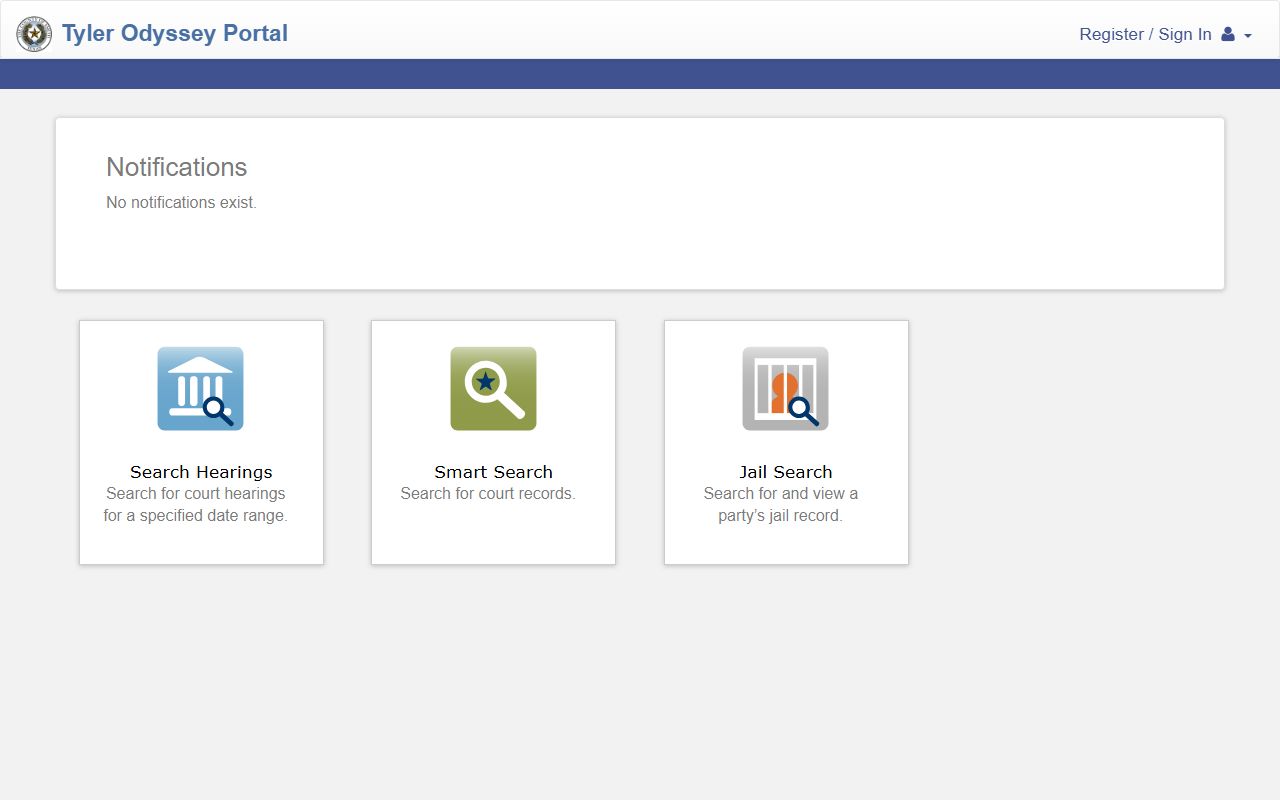
For booking photos, choose the jail path rather than the court path. Court records may explain the filed charge after arrest, but the Mugshots tab belongs to the jailing profile when a photo is available.
- Open the Smith County Jail Search app at portal.smith-county.com/app/JailSearch/.
- Enter at least three characters in the search field. A last name, full last name plus first initial, booking number, or uncommon agency or charge term can help.
- Use date filters such as Date Booked or Date Released if the search returns many records or the booking is historical.
- Select the View Jailing action on the matching result.
- Open the Mugshots section if the navigation button appears.
- Review any Front Profile, Left Profile, or Right Profile images. The app text says the image can be clicked to zoom.
- If no Mugshots tab appears, treat the photo as not exposed in the public profile and use the public-information request route if a booking photo is still needed.
What a Smith County Booking Photo Record Shows
A booking photo is only one field in the Smith County View Jailing profile. The profile can include identity fields, booking fields, charge fields, warrant fields, bond type, and release fields. The result card is a shorter summary, while View Jailing is the fuller record. Because the profile may show several charges and identifiers, copy the SO number and booking number when matching the jail record to later court records.
| Field | What It Shows |
|---|---|
| Booking Photo | Front Profile, Left Profile, or Right Profile image when the corresponding public mugshot flag is true. |
| Name | The person's name, usually displayed last name first. |
| SO # | Sheriff's office identifier for the person. |
| Booking # | Jail booking identifier, with modern examples using a format such as B26-03304. |
| Facility | The jail facility label, such as Main Jail in the inspected sample. |
| Booking Date and Time | The date and time the jailing record was created or booked. |
| Release Date and Time | Blank for current custody in some records, populated for released jailings. |
| Aliases | Known alias names when included in the profile. |
| Description, Hair, Eyes | Physical description fields such as race, gender, height, weight, hair, and eye color. |
| Charges | Charge description, warrant number, issuing authority, offense date, arrest date, arresting agency, bond/type, total due of fine and costs, and disposition fields when present. |
| Bond/Type | Bond category for a charge, such as Surety Bond in the inspected sample. A dollar amount is not guaranteed on every public profile. |
| Redactions or blanks | DOB display may be blank. Social Security and driver-license details should not be expected in the public view. |
Roster Sample-Record Inventory and Photo Field
The search result card and View Jailing profile serve different purposes. The search card can help identify the right person before opening a detailed record. The View Jailing profile is where the Mugshots section appears if Smith County exposes a booking photo for that jailing.
| Roster Field | Photo or Records Use |
|---|---|
| Defendant name | Primary name to search and match against the profile photo. |
| SO # | Useful when several people have similar names or when connecting the jail profile to court search. |
| Booking Number / Booking # | Best identifier for a specific jailing event and a useful request detail for a mugshot. |
| Facility / nodeName | Public facility label, such as Main Jail. |
| Date/Time Booked | Helps distinguish current and historical records. |
| Date/Time Released | Shows whether the person has left custody when populated. |
| Arresting Agency | Identifies the agency tied to the arrest record. |
| Charges | Can explain why a booking photo exists, but does not prove conviction. |
| Mugshots | Front, left, and right images only when the public flags are available. |
| Aliases and physical description | Help confirm identity before relying on a photo match. |
Are Smith County Jail Mugshots Public Record?
Texas has no single statute that makes every mugshot categorically public or categorically confidential. Smith County booking-photo access runs through the Texas Public Information Act, law-enforcement exceptions, juvenile confidentiality laws, court orders, expunction, nondisclosure, and local release practice. A mugshot visible in View Jailing is public in the practical sense that the portal exposes it, but a missing photo does not prove the photo never existed or that it must be released.
State mugshot-law callout:
Texas Government Code Chapter 552 gives the public a right to government information unless an exception or confidentiality law applies.
Texas Government Code section 552.108(c) preserves access to basic information about an arrested person, an arrest, or a crime even when some law-enforcement information may be withheld.
Texas Code of Criminal Procedure Chapter 55A governs expunction of qualifying arrest records, which can affect public access to booking records and photos.
How Long a Mugshot Stays on the Roster
The Smith County app does not state a fixed retention period for online mugshots. The jail search is broader than a current-inmates-only list because test searches returned both historical released records and current unreleased records. That means a released jailing may remain searchable, but it does not mean every old record keeps a public photo. Some older converted records may have no photo, and some records may stop appearing because of restriction, sealing, expunction, nondisclosure, or data-publication limits.
What is and isn't public: The public may see jailing fields, charge descriptions, bond/type information, warrant fields, and front/left/right mugshots when the profile exposes them. Juvenile information, sealed or expunged records, protected details, pending-investigation material, and non-public identifiers may be withheld or omitted. A visible mugshot is not proof of guilt, and a missing mugshot is not proof that no booking photo exists.
How to Find or Request a Smith County Booking Photo
The fastest path is still the jail profile. If the public app does not expose a photo, use the Smith County JustFOIA request process linked from official sheriff and county materials. A request should identify the person by full name, booking number if known, SO number if known, arrest date, and the specific record sought, such as the front booking photo for a particular jailing.
- Search Jail Search and open View Jailing for the correct record.
- Check whether the Mugshots section appears and whether Front Profile, Left Profile, or Right Profile images are available.
- If no photo appears, collect the name, SO number, booking number, arrest date, arresting agency, and charge description from the profile.
- Submit a public-information request through Smith County JustFOIA and ask for the booking photo for that specific jailing.
- Expect Smith County to review the request under Chapter 552 and any applicable law-enforcement, juvenile, court-order, expunction, or nondisclosure limits.
- If the requested item is a court-file exhibit or formal case document rather than a jail booking photo, route the request to the appropriate court clerk or court portal.
For immediate custody confirmation or release timing, call the jail line at 903-590-2800. A phone call can confirm custody or routing, but it is not the same as a written public-information request for a photo record.
Mugshot Removal and Sealed Records
Smith County research did not locate an official rule promising automatic mugshot removal after release, dismissal, or a set number of days. Removal from public view usually depends on the legal status of the underlying record, a court order, an expunction, a nondisclosure order, or a county process that applies to the record. Do not assume a dismissed charge automatically erases a public booking record.
Texas expunction is governed by Code of Criminal Procedure Chapter 55A. Nondisclosure is governed by Government Code Chapter 411, Subchapter E-1. Those processes are legal remedies, and eligibility turns on the disposition, offense type, timing, and prior record. For the court-record side of this issue, see sealing and expunging an arrest record. Commercial mugshot sites are not official Smith County sources and should not be treated as proof of current custody, court status, or official record availability.
Booking Photos vs. Court Records After an Arrest
A Smith County mugshot is part of the jail record. It may help identify the jailing profile, but it does not show whether the DA accepted the charge, whether a complaint, information, or indictment was filed, or whether the person was convicted. For filed charges, use Smart Search and the clerk offices. Felony matters generally route to the District Clerk, while misdemeanor matters route to the County Clerk's criminal misdemeanor department.
The distinction matters because booking charges can differ from court charges. A jail profile may show an arresting-agency charge and warrant information, while the court file may later show amended, reduced, added, dismissed, or indicted charges. A booking photo should never be used as a shortcut for a court outcome.
Federal and State Booking Photos
Federal BOP systems do not publish booking mugshots the way county jail portals may. The BOP inmate locator generally shows identity, register number, age, race, sex, release date, and location information for federal prisoners from 1982 to present, not county-style booking photos. Federal pretrial detainees may also be in U.S. Marshals custody or a contract jail and may not appear in BOP as a sentenced prisoner.
Texas Department of Criminal Justice records are separate from the Smith County jail portal. A person sentenced to TDCJ may leave local custody and become searchable through the TDCJ statewide locator. TDCJ locator results are for sentenced state custody and should not be confused with Smith County booking photos from a local arrest. Immigration custody is separate again and is searched through ICE's detainee locator when applicable.